This article summarizes all the key updates to the Pangea platform during fiscal year 2025 (FY2025).
FY2025 covers the period October 1, 2024 - September 30, 2025.
On this page:
Top highlights:
- New PangeaGO mobile app
- Section and category merging
- AI audio narration
- AI suggestions for titles, introductions, and summaries
- Approval process for updates to published content
- Title graphics
More highlights:
- Expandable notes
- Inline notes
- Summaries for text content pages
- Project marking
- Sorting for search results on websites
- Manual live stream history
- Auto approval for Datawrapper snippets and dynamic infographics
- ‘Pen name’ option for authors
- Season and episode labels for video podcasts
New PangeaGO mobile app
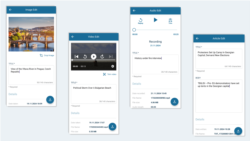
PangeaGO is a mobile app designed specifically for field journalists. Using PangeaGO, journalists can quickly upload photos, videos, audio, and simple articles to Pangea CMS. In Pangea CMS, an editor in the newsroom can prepare and publish the content.
Section and category merging
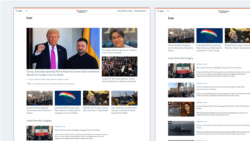
Sections and categories can now be merged. After merging, the section appears on the category page above the list of content.
This helps when a topic has two landing pages: a section and a category page. Merging creates one clear landing page for the topic with one set of metadata and one URL.
AI audio narration
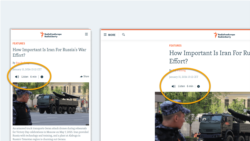
AI-powered audio narration lets visitors listen to a story instead of reading it.
To enable this feature on your website, contact Pangea Customer Care. Once enabled, you can generate audio versions of text content pages in Pangea CMS. Visitors can select ‘Listen’ on the public website to hear the audio version.
Applies to the following content types:
- Text: Article, Blog, Feature, Feature story, News, Transcript
AI suggestions for titles, introductions, and summaries
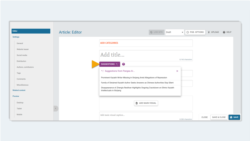
Pangea CMS now suggests titles, introductions, and summaries for text content pages. AI suggestions offer a useful starting point for editors.
Applies to the following content types:
- Text: Article, Blog, Feature, Feature story, News, Transcript
To enable this feature for your team, contact Pangea Customer Care. We can enable AI suggestions for each text type separately. For example, your team can have access to AI suggestions for titles but not other fields.
Approval process for updates to published content
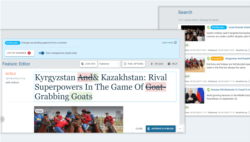
You can save updates to published text content internally in Pangea CMS and request approval from a reviewer before publishing. The reviewer can then approve and publish the changes.
Applies to the following content types:
- Text: Article, Blog, Feature, Feature story, News, Transcript
Title graphics
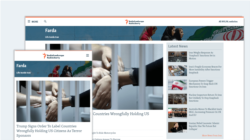
You can now show custom title graphics on section pages.
A title graphic spans the full page width below the site header. It shows the main page title over a background image, replacing the plain text title.
Expandable notes
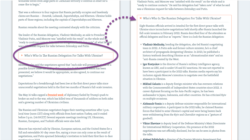
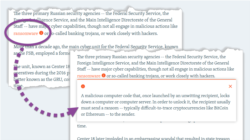
You can now add expandable notes to text content pages. An expandable note is a panel that readers can open and close. They help you tell rich, detailed stories without overwhelming the page. Use expandable notes to share non-essential details like historical context, profiles of key figures, side stories, and background information.
Applies to the following content types:
- Text: Article, Blog, Factcheck, Feature, Feature story, Live blog, News, Transcript
Inline notes
You can now add inline notes to text content pages. An inline note is a simple explanation of a word or phrase, which readers can open by selecting the launcher text. Use inline notes to clarify confusing words and phrases without overwhelming the page.
Applies to the following content types:
- Text: Article, Blog, Factcheck, Feature, Feature story, Live blog, News, Transcript
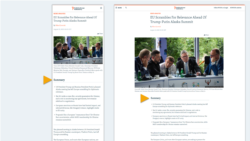
Summaries for text content pages
You can now show summaries on text content pages. A summary is a short bullet list of the key takeaways from a story.
Applies to the following content types:
- Text: Article, Blog, Feature, Feature story, News, Transcript
To enable this feature on your website, contact Pangea Customer Care. Once enabled, you can create summaries for text content pages in Pangea CMS.
Project marking
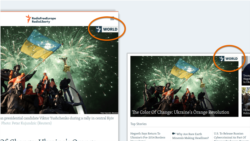
Project marking lets you mark content pages that belong to a special project. This feature was introduced to support the ‘RFE/RL World’ project, which highlights the most important stories across all RFE/RL services.
To set up a new special project, your Digital Strategy team can contact Pangea Customer Care. We will assist with setup, including design and technical implementation.
Sorting for search results on websites
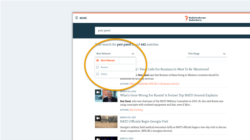
Visitors on public websites can now sort search results by relevance or publication date. Sorting by relevance prioritizes content focused on the search topic.
To set how search results on your website are sorted by default, contact Pangea Customer Care.
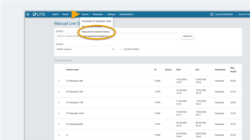
Manual live stream history
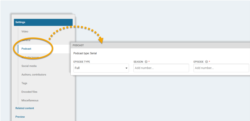
The new Manual live stream history page in Pangea CMS lets you check your service’s complete history of manual live stream requests. This page is available via Stream > Manual live stream history.
Auto approval for Datawrapper snippets and dynamic infographics
When you create a snippet or dynamic infographic, Pangea CMS recognizes code from Datawrapper and approves it automatically. This lets you publish code from a trusted platform immediately without waiting for reviewer approval.
‘Pen name’ option for authors
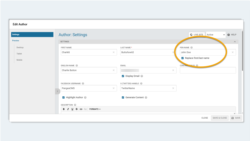
You can add a pen name for authors in Pangea CMS. The pen name appears on the public website instead of the author’s real name, which is useful if the author needs to remain anonymous.
Season and episode labels for video podcasts
If your service produces video podcasts, you can specify whether the podcast is serial or episodic and add season and episode numbers for videos in Pangea CMS. These labels appear on platforms like Apple Podcasts and help audiences understand your content.