This article summarizes all the key updates to the Pangea platform during fiscal year 2026 (FY2026).
FY2026 covers the period October 1, 2025 - September 30, 2026.
On this page:
Top highlights:
- Interactive experience for embedded galleries
- 'Smart link' button on content pages
- PDF download on text content pages
More highlights:
- Category links at the bottom of text content pages
- Stealth publishing for galleries
- Dynamic infographics and snippets - Upgrade to CMS8
- History dialog - List of changes with each version
- Improved experience for video trimming
- Vertical player for embedded videos
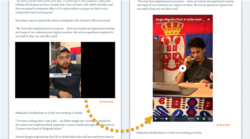
Interactive experience for embedded galleries
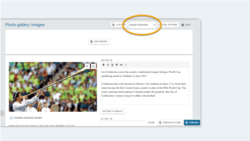
Embedded galleries on text content pages have a new interactive layout, which lets readers browse through all images without leaving the page.
Applies to the following content types:
- Multimedia: Photo gallery, Slider gallery
'Smart link' button on content pages
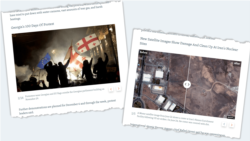
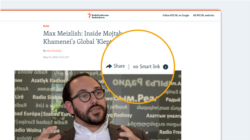
Content pages can now display a Smart link button. This button copies the smart link for the page to the visitor's clipboard. Visitors can then share this link with people in regions where access to your site is blocked.
To enable this feature on your website, contact Pangea Customer Care. Once enabled, the Smart link button appears automatically on content pages.
PDF download on text content pages
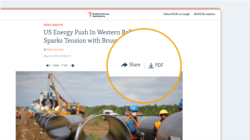
Text content pages can now display a PDF button. This button downloads a PDF version of the page. Visitors can then share the PDF with people in regions where access to your site is blocked.
Applies to the following content types:
- Text: Article, Blog, Feature, Feature story, News, Transcript
To enable this feature on your website, contact Pangea Customer Care. Once enabled, the PDF button appears automatically on the content types listed above. It only appears on pages that are published or updated after the feature is enabled.
Category links at the bottom of text content pages
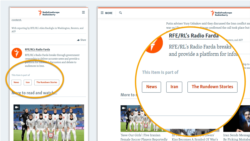
To help readers discover related content, category links now appear at the bottom of text content pages.
Applies to the following content types:
- Text: Article, Blog, Feature, Feature story, News, Transcript
A link appears for every public category that is assigned to the page. Each link opens the relevant category page.
Stealth publishing for galleries
Stealth publishing is now available for galleries. This means stealth publishing is available for the following content types:
- Photo gallery (NEW)
- Slider gallery (NEW)
- Video
Stealth content does not have a standalone page and is not indexed by search engines. You can embed stealth content as supporting content on text content pages. Use stealth publishing for content that supports storytelling but does not need a standalone page.
Dynamic infographics and snippets - Upgrade to CMS8
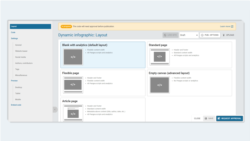
We've upgraded the dynamic infographic and snippet edit pages to CMS8 is our latest design and development strategy for pages in Pangea CMS. Learn more..
This upgrade offers improved speed, performance, and usability, with a more modern look and feel.
History dialog - List of changes with each version
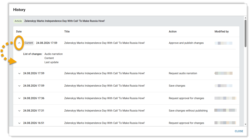
For text content pages, the History dialog now includes a list of changes with each version. This shows which settings changed.
Applies to the following content types:
- Text: Article, Blog, Feature, Feature story, News, Transcript
Improved experience for video trimming
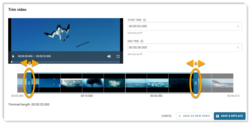
The Trim video dialog now includes a timeline. Drag the trim handles along the timeline to set the new start and end times.
When trimming is complete, choose how to save the result:
- Save & replace (NEW): The trimmed video replaces the original. Only one video is saved.
- Save as new video: The trimmed video is saved as a new video. Both videos are saved.
Vertical player for embedded videos
Vertical video embeds now appear full-size in a vertical player on all devices. Previously, vertical videos appeared in a horizontal player with black bars on the sides.