
Release schedule:
The Pangea 8.48 release is scheduled for July 21, 2026 at the times listed below:
Radio Free Europe / Radio Liberty, Inc.
- Prague time: 5:00 AM - 7:00 AM
- DC / Miami time: 11:00 PM (July 20) - 1:00 AM (July 21)
Voice of America
- DC / Miami time: 2:00 AM - 4:00 AM
- Prague time: 8:00 AM - 10:00 AM
Office of Cuba Broadcasting
- DC / Miami time: 4:00 AM - 5:00 AM
- Prague time: 10:00 AM - 11:00 AM
LibertyNet
- Prague time: 7:00 AM - 8:00 AM
- DC / Miami time: 1:00 AM - 2:00 AM
What's new?
- Stealth publishing for galleries
- Improved experience for video trimming
- 'Prefer us on Google' button
- Customize or hide the title for embedded galleries
- Unbranded PDF downloads
- Welcome email for new Pangea CMS users
Stealth publishing for galleries
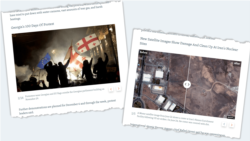
Stealth publishing is now available for galleries. This means stealth publishing is available for the following content types:
- Photo gallery (NEW)
- Slider gallery (NEW)
- Video
Stealth content does not have a standalone page and is not indexed by search engines. You can insert stealth content on the following text content pages:
- Article, Blog, Factcheck, Feature, Feature story, Live blog, News, Transcript
Use stealth publishing for content that supports storytelling but does not need a standalone page.
For detailed information, see Stealth publishing a content item.
Improved experience for video trimming
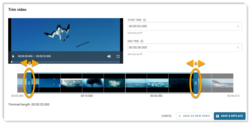
The Trim video dialog now includes a timeline. Drag the trim handles along the timeline to set the new start and end times.
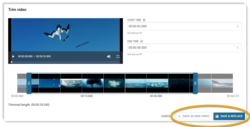
When trimming is complete, choose how to save the result:
- Save & replace (NEW): The trimmed video replaces the original. Only one video is saved.
- Save as new video: The trimmed video is saved as a new video. Both videos are saved.
For detailed instructions, see Publishing an on-demand video.
'Prefer us on Google' button
Google's preferred sources feature allows readers to choose specific news websites they want to see more often in Google search results.
For more information, see Google's blog post:
To promote this option to readers, you can add a Prefer us on Google button to your website. This button appears on all types of content pages. It opens a page where readers can add your website as a preferred source on Google.
NOTE: The Prefer us on Google button does not appear on pages that use the Latest news layout.
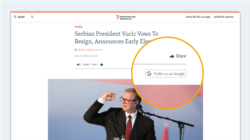
Enable this feature
We can enable this feature for websites on request. To add the Prefer us on Google button to your website, contact Pangea Customer Care. In your request, include the button label ('Prefer us on Google') translated into your website's language.
Update localization
When this feature is enabled, you can update the button label from the Site localization page in Pangea CMS. Use the following key:
| Key name | Default value | Purpose |
|---|---|---|
| Responsive.PreferOnGoogle.Title | Prefer us on Google | The label for the 'Prefer us on Google' button on content pages. |
To learn how to use the Site localization page, see Using site localization.
Customize or hide the title for embedded galleries
When you embed a gallery on a content page, the following options are now available for the title:
- Show the default title.
- Create a custom title (NEW).
- Hide the title (NEW).
Customizing or hiding the gallery title is useful when the default title duplicates nearby text on the page.
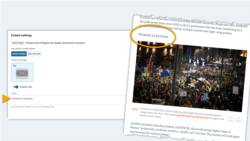
These options apply to the following gallery types:
- Photo gallery
- Slider gallery
For detailed information, see Inserting direct embeds.
Unbranded PDF downloads
In the Pangea 8.47 release, we introduced the new PDF download feature. This feature allows readers to download your articles as PDFs.
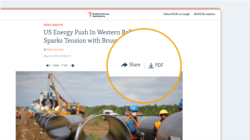
In this release, we are introducing a new option for websites that use the PDF download feature: unbranded PDFs. When enabled, PDF downloads from your website do not show the branded header at the top of the PDF. This is helpful in regions where your website is blocked or where local authorities disapprove of it. Without the branded header, readers can view your articles in public without drawing attention to the source.
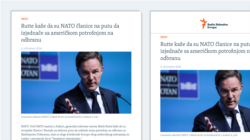
Enable this feature
We can enable this feature for websites on request. To enable unbranded PDFs for your website, contact Pangea Customer Care.
Welcome email for new Pangea CMS users
New Pangea CMS users now automatically receive a welcome email from the Pangea team. The email includes key information and links:
- How to log in to Pangea CMS
- How to request training with Pangea Customer Care
- How to report a bug
- How to subscribe to our newsletter
- How to access the Pangea CMS Guide on the Pangea Showcase website
The welcome email gives new users the information they need to start working in Pangea CMS and to find support when they need it.