
Release schedule:
The Pangea 8.47 release is scheduled for May 26, 2026 at the times listed below:
Radio Free Europe / Radio Liberty, Inc.
- Prague time: 5:00 AM - 7:00 AM
- DC / Miami time: 11:00 PM (May 25) - 1:00 AM (May 26)
Voice of America
- DC / Miami time: 2:00 AM - 4:00 AM
- Prague time: 8:00 AM - 10:00 AM
Office of Cuba Broadcasting
- DC / Miami time: 4:00 AM - 5:00 AM
- Prague time: 10:00 AM - 11:00 AM
LibertyNet
- Prague time: 7:00 AM - 8:00 AM
- DC / Miami time: 1:00 AM - 2:00 AM
What's new?
- Interactive experience for embedded galleries
- 'Smart link' button on content pages
- PDF download on text content pages
- 'Follow us' navigation on text content pages
- Option to add Google to the 'Follow us' navigation
- Faster processing for video and audio uploads
- Improved right-to-left experience in Pangea CMS
- Search filter to quickly find stealth videos
Interactive experience for embedded galleries
Embedded galleries on article pages have a new interactive layout, which lets readers browse through all images without leaving the article.
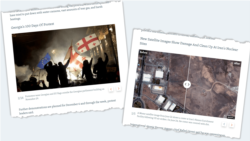
Previously, interacting with a gallery automatically opened the gallery in full-screen mode or redirected the reader to a new page. The new layout removes this disruption and keeps readers engaged with your content.
Improvements apply to the following gallery types:
- Photo gallery
- Slider gallery
Improvements apply for galleries embedded in the body of articles and galleries used as main visuals.
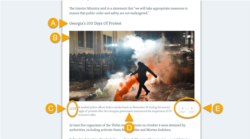
Photo gallery layout
The new interactive layout includes:
- (A): Title: The title for the gallery.
- (B): Images: The images in the gallery.
- (C): Counter: A counter showing the progress and total number of images.
- (D): Captions: The caption for each image.
- (E): Browsing: Buttons for browsing through the images.
Slider gallery layout
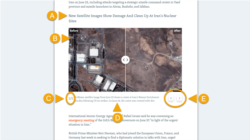
The new interactive layout includes:
- (A): Title: The title for the gallery.
- (B): Image pairs: The image pairs in the gallery. For each pair, readers can drag the slider to compare the two images.
- (C): Counter: A counter showing the progress and total number of image pairs (only for galleries with multiple image pairs).
- (D): Captions: The caption for each image pair.
- (E): Browsing: Buttons for browsing through the image pairs (only for galleries with multiple image pairs).
Create and embed a gallery
You need to create and publish the gallery in Pangea CMS before you can embed it in an article. For instructions, see the relevant article:
For instructions on embedding galleries, see our Inserting direct embeds article.
Guidelines
Embedded galleries display differently compared to standalone gallery pages. When you create a gallery to embed in an article, follow these guidelines for the best experience on the article page:
- Use images with the 16:9 Aspect ratio describes the proportional relationship between the width and height of an image (such as 16:9 or 3:4). Aspect ratio determines the shape of an image but not its size. Learn more.. Images with a different aspect ratio are automatically cropped, so you may lose important parts of your images.
- Avoid long captions. If one image has a long caption, the article text below it is pushed down, leaving a large gap on the page.
'Smart link' button on content pages
Content pages can now display a Smart link button. This button copies the smart link for the page to the visitor's clipboard. Visitors can then share this link with people in regions where access to your site is blocked.
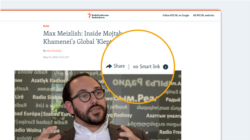
Enable this feature
We can enable this feature for websites on request. If you want to display the Smart link button on content pages, contact Pangea Customer Care.
In your request, include localizations of the following default texts:
| Default text | Purpose |
|---|---|
| Smart link | The label for the 'Smart link' button on content pages. |
| A link to this page that works in regions where our site is blocked. | Helper text that appears with the 'Smart link' button on content pages. |
TIP: Choose language that your website audience can understand. You do not need to translate these texts directly.
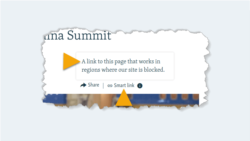
Visibility
When this feature is enabled, the Smart link button appears automatically on the following types of content pages:
- Text
- Article, Blog, Factcheck, Feature, Feature story, Live blog, News, Transcript
- Multimedia
- Audio clip, Photo gallery, Slider gallery, Video
- Interactive
- Dynamic infographic (with article layout), Poll, Quiz, Static infographic
NOTE: The Smart link button does not appear on pages that use the Latest news layout.
PDF downloads on text content pages
Selected text content pages can now display a PDF button. This button downloads a PDF version of the page. Visitors can then share the PDF with people in regions where access to your site is blocked.
Applies to: Article, Blog, Feature, Feature story, News, Transcript
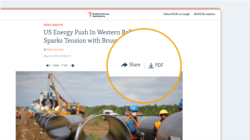
Enable this feature
We can enable this feature for websites on request. If you want to display the PDF button on content pages, contact Pangea Customer Care.
To use a button label other than 'PDF', include your preferred label in the request.
Visibility
The button only appears on content pages that are published or updated after the feature is enabled.
NOTE: The PDF button does not appear on pages that use the Latest news layout.
'Follow us' navigation on text content pages
A Follow us button now appears on select text content pages below the main content. This opens a list of links to your social media accounts. Readers can use these links to find and follow you on their preferred platforms.
Applies to: Article, Blog, Feature, Feature story, News, Transcript
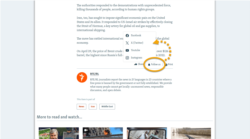
Update localizations
After the 8.47 release, editors on non-English sites need to review the following texts on the Site localization page in Pangea CMS and add new localizations:
| Key name | Default value | Purpose |
|---|---|---|
| Responsive.FollowLabel | Follow us | The label for the 'Follow us' button on content pages. |
| Responsive.FollowUsOnAltText | Follow us on | Text before the platform name in the alt text for each platform button. For example: 'Follow us on Facebook'. The platform names are defined in separate keys. |
To learn how to use site localization, see Using site localization.
Set the links
By default, the 'Follow us' navigation on content pages includes the following links:
- Facebook: https://facebook.com
- X (Twitter): https://x.com
- YouTube: https://www.youtube.com
- Instagram: https://www.instagram.com
To update these links, contact Pangea Customer Care.
In your request, include:
- The platforms you want to show, in the order you want them to appear
- A URL for each platform
For more information and a list of supported platforms, see Core website navigation.
Option to add Google to the 'Follow us' navigation
You can now add a Follow us on Google button to the 'Follow us' navigation.
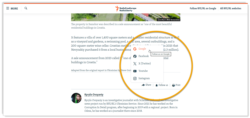
This option lets readers add you as a preferred source for Google search results. For more information, see Google's blog post:
To add the Follow us on Google button to your 'Follow us' navigation, contact Pangea Customer Care.
In your request, include:
- The URL for the button. For example:
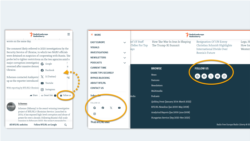
- The locations where you want to display the button. You can select some or all of the following:
- Under 'Follow us' on content pages
- Under 'Follow us' in the primary navigation
- Under 'Follow us' in the footer navigation
Faster processing for video and audio uploads
Following infrastructure upgrades, video and audio files uploaded to Pangea CMS now process up to 30% faster.
Improved right-to-left experience in Pangea CMS
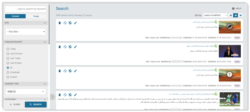
It is now easier to read and edit right-to-left (RTL) text in Pangea CMS. For sites that publish in an RTL language, text in the local language now displays RTL. English text continues to display left-to-right (LTR).
Search filter to quickly find stealth videos
A Stealth published filter is now available under Status when you run a content search in Pangea CMS.
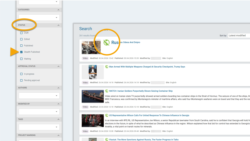
When you select this filter, the results specifically include videos with the 'Stealth published' status.
For information about stealth publishing, see Stealth publishing a video.