
Release schedule:
The Pangea 8.44 release is scheduled for Wednesday, November 19th 2025 at the times listed below:
Radio Free Europe / Radio Liberty, Inc.
- Prague time: 05:00 am - 07:00 am
- DC / Miami time: 11:00 pm (November 18th) - 01:00 am (November 19th)
Voice of America
- DC / Miami time: 02:00 am - 04:00 am
- Prague time: 08:00 am - 10:00 am
Office of Cuba Broadcasting
- DC / Miami time: 04:00 am - 05:00 am
- Prague time: 10:00 am - 11:00 am
LibertyNet
- Prague time: 07:00 am - 08:00 am
- DC / Miami time: 01:00 am - 02:00 am
What's new?
- Vertical player for embedded videos
- Sharing navigation redesign
- AI Content Assistance: New ChatGPT model
- AI Audio Narration: Custom pronunciations
- Small image embeds on mobile
- Region retirement (effective from 8.45)
- Slide-in widget retirement (effective from 8.45)
Vertical player for embedded videos
Vertical video embeds now appear in a vertical player on all devices, not just on mobile. Previously, vertical videos appeared in a horizontal player with black bars on the sides.
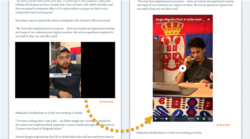
This change applies for vertical video embeds on the following text content pages:
- Article | Blog | FactCheck | Feature | Feature story | Live blog | News | Transcript
This change also applies for vertical video embeds on HTML widgets.
To make your vertical videos look as attractive as possible, optimize both the horizontal and vertical thumbnails. For details, see the following article:
Sharing navigation redesign
We have completely redesigned the sharing navigation that appears on content pages. All actions are now grouped together under a single Share button.
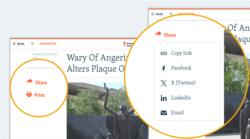
This approach offers the following main benefits:
- Clearer labeling: The "Share" label is directly visible and clearly communicates the button's purpose.
- Cleaner pages: The new navigation occupies less space, removing visual clutter from content pages.
New behavior for content sharing on mobile
On mobile devices, the new Share button opens the native share card (on devices and browsers that support this functionality). The share card provides convenient access to all installed apps on the particular device that can be used for content sharing.
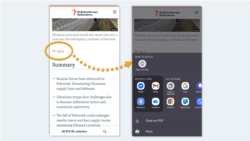
NOTE: Where the native share card is not supported, the Share button opens the website sharing navigation (same as on desktop).
What you need to do
We've updated some global share button labels to be shorter. If your site uses localized labels, go to the Site localization page in Pangea CMS and update them to match the new global values:
| Key name | Global value (new) |
|---|---|
| Responsive.Sharing.CopyLink | Copy link |
| Responsive.Social.EmailToFriend |
The Copy link and Email buttons will start to appear on every website. Please add local values, even if these buttons don't currently appear on your site.
The buttons for specific platforms (such as Facebook and Telegram) will update automatically with no action required from services. For example:
- "Share on Facebook" will change to Facebook.
- "Share on Telegram" will change to Telegram.
AI Content Assistance: New ChatGPT model
We've updated AI Content Assistance to work with Chat GPT 5, the latest ChatGPT model. This update gives editors access to more advanced AI capabilities.
After the 8.44 release, we'll test ChatGPT 5 with a small group of services. If testing goes well, we'll enable this update for all our pilot services in the following weeks.
NOTE: AI Content Assistance is a new feature on the Pangea platform, which is currently only available for selected pilot services. Learn more.
AI Audio Narration: Custom pronunciations
You can now tell AI Audio Narration how to pronounce particular words. This is useful if the AI consistently mispronounces a word that commonly appears in your articles.
Custom pronunciations are set individually per website. To add one or more custom pronunciation rules, contact Pangea Customer Care.
NOTE: We can configure AI Audio Narration for individual services on request, subject to language availability. Learn more.
Small image embeds on mobile
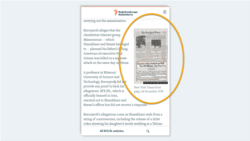
Small images on content pages (images embedded using the Small size option) now show in a smaller size also on mobile. Previously, the smaller size was only visible on desktop.
Region retirement (effective from 8.45)
Regions will be retired in the Pangea 8.45 release (January 27, 2026). Regions will continue to work normally after 8.44, but will not be visible on content pages after 8.45.
Find more details below:
A Region is a collection of widgets that appears on article pages (at the side of the page on desktop and below the main content on mobile devices).

Slide-in widget retirement (effective from 8.45)
Slide-in widgets will be retired in the Pangea 8.45 release (January 27, 2026). Slide-in widgets will continue to work normally after 8.44, but will not be visible on content pages after 8.45.
Find more details below:
A Slide-in widget is a special widget that slides in at the bottom of an article page after a reader starts scrolling.