
Release schedule:
The Pangea 8.45 release is scheduled for January 27, 2026 at the times listed below:
Radio Free Europe / Radio Liberty, Inc.
- Prague time: 5:00 AM - 7:00 AM
- DC / Miami time: 11:00 PM (January 26) - 1:00 AM
Voice of America
- DC / Miami time: 2:00 AM - 4:00 AM
- Prague time: 8:00 AM - 10:00 AM
Office of Cuba Broadcasting
- DC / Miami time: 4:00 AM - 5:00 AM
- Prague time: 10:00 AM - 11:00 AM
LibertyNet
- Prague time: 7:00 AM - 8:00 AM
- DC / Miami time: 1:00 AM - 2:00 AM
What's new?
- New streamlined layout for articles
- New overlay for comments
- Region retirement
- Slide-in widget retirement
- AI Audio narration - New disclaimer
- AI Audio narration - ElevenLabs becomes additional provider
- Simplified process for embedding content
- Action bar - New 'Newsletter' button option
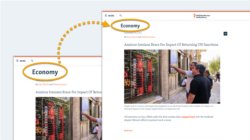
- Section titles move to the page body
- Smaller page titles on desktop
New streamlined layout for articles
Text content pages now have a streamlined one-column layout. The simplified design helps readers stay focused on the story and is based on insights from research interviews with website readers.
Applies to: Article, Blog, Factcheck, Feature, News, Transcript
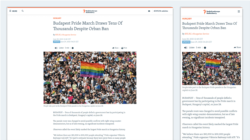
You can learn more about the changes below:
Summary of changes
At the top of the article:
- (A): The key article metadata (category, author, publication date & time) is now centralized in one column together with the title.
- (B): Action buttons ('Listen', 'Share', 'See comments', 'Print') are now grouped together in one toolbar above the main visual.
- (C): The title is smaller on desktop for better content visibility without scrolling.
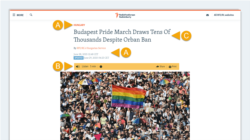
All elements are centralized, creating a linear path for the eye. This reduces cognitive load and matches how most people naturally read.
At the bottom of the article:
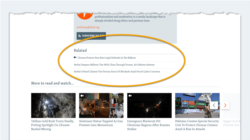
- (A): A new horizontal line clearly signals the end of the story.
- (B): We've added action buttons ('Share', 'See comments') for readers who want to take these actions after reading the story.
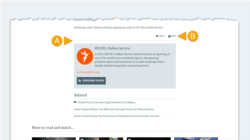
Related content has a simplified new design without images. We've also changed the placement on desktop, so Related content now appears at the bottom of the story on all devices. This prioritizes the reading experience, allowing readers to finish the current article before considering related links.
Changes in Pangea CMS
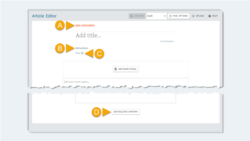
We've updated the article edit page in Pangea CMS to match the new layout for published articles. On the Editor subpage, the position of the following buttons has changed:
- (A): Add Categories
- (B): Add authors
- (C): Now
- (D): Add Related content
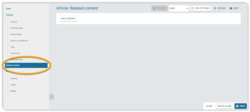
On the Editor subpage, 'Add Related content' is now below the article body. To avoid scrolling on longer articles, use 'Related content' in the left panel.
New overlay for comments
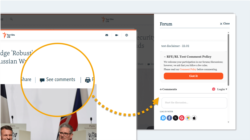
On all content pages with commenting enabled, comments now appear in an overlay rather than directly on the page. This creates a cleaner design and reduces the length of the page, which is especially important for readers scrolling on mobile devices.
To open comments, readers can hit the See comments button. This appears both at the top and bottom of the article for enhanced visibility. If readers have already left comments, the number of comments appears on the button.
Region retirement
Regions have been retired and will automatically disappear from Pangea websites after the 8.45 release.
Find more details below:
A Region is a collection of widgets that appears on article pages (at the side of the page on desktop and below the main content on mobile devices).

Slide-in widget retirement
Slide-in widgets have been retired and will automatically disappear from Pangea websites after the 8.45 release.
Find more details below:
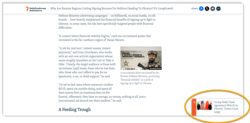
A Slide-in widget is a special widget that slides in at the bottom of an article page after a reader starts scrolling.
AI Audio narration - New disclaimer
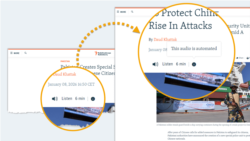
We've updated and redesigned the disclaimer that appears with the Listen button on text content pages. Now, the disclaimer appears when a reader hits the info button — it's no longer visible directly on the page.
New disclaimer text
Following a request from RFE/RL news division management, we've also updated the global disclaimer text. The global text is now:
- This audio is automated
Site admins should update local texts to reflect the new global text. This text can be managed on the Site localization page in Pangea CMS using the following key:
- ArticleNarration.AIGenerated
Option to add 'Learn more' link
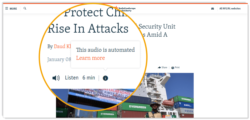
Sites can add a Learn more link to the disclaimer that opens an Infopage with information about your site's AI policy. (RFE/RL news division management will distribute standard text for this page.)
Contact Pangea Customer Care to add a 'Learn more' link to your website's Audio narration disclaimer. In your request, please include:
- The URL for the link.
- The 'Learn more' text in your local language.
AI Audio narration - ElevenLabs becomes additional provider
The Audio narration feature can now be powered by either of the following third-party service providers:
- ElevenLabs (NEW)
- Azure AI
ElevenLabs supports fewer languages compared to Azure AI, but can offer higher quality audio with more natural-sounding speech for some languages.
Find more details below:
To learn more about Audio narration, see the following article:
Simplified process for embedding content
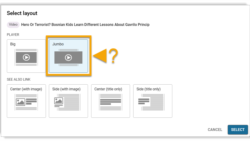
In Pangea CMS, we've simplified the process for inserting direct embeds and see also links on text content pages.
On the Select layout dialog, you see all the available layouts with a supporting graphic for each option. Conveniently select the layout you want to use with one click.
For detailed information, see the following articles:
Action bar - New 'Newsletter' button option
Websites can now add a Newsletter button to the action bar. This button shows an envelope icon.
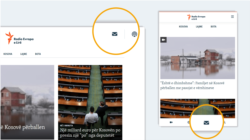
To add a 'Newsletter' button to your action bar, contact Pangea Customer Care. In your request, please include:
- The URL for the link (normally your newsletter subscription page).
- The button title in your local language.
- Your desired order for the buttons.
- If you want the new button to replace an existing button.
NOTE: On mobile, the Search button always appears in the action bar. We recommend showing a maximum of 3-4 additional buttons, though this may vary depending on button size.
For detailed information about the action bar and other core navigation elements, see the following article:
Section titles move to the page body
We've moved Section titles from the header into the page body on desktop. This makes titles more visible and helps visitors navigate your site with confidence.
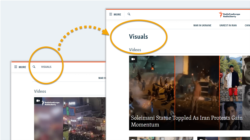
Title graphics and banners
On Section pages that display traditional title banners, you'll now see both the plain title and the banner together. (The plain title will appear directly above the banner.)
To avoid this duplication, choose one of the following options:
- Remove the title banners to show only the plain title.
- Replace title banners with title graphics using the 'Title graphic' feature on the Section edit page in Pangea CMS. To learn more, see the following article:
Smaller page titles on desktop
Most page titles are now smaller on desktop. This balances title prominence with content visibility, so visitors can see more of your page without scrolling. The title size remains unchanged on mobile.