
Release schedule:
The Pangea 8.46 release is scheduled for March 31, 2026 at the times listed below:
Radio Free Europe / Radio Liberty, Inc.
- Prague time: 5:00 AM - 7:00 AM
- DC / Miami time: 11:00 PM (March 30) - 1:00 AM (March 31)
Voice of America
- DC / Miami time: 2:00 AM - 4:00 AM
- Prague time: 8:00 AM - 10:00 AM
Office of Cuba Broadcasting
- DC / Miami time: 4:00 AM - 5:00 AM
- Prague time: 10:00 AM - 11:00 AM
LibertyNet
- Prague time: 7:00 AM - 8:00 AM
- DC / Miami time: 1:00 AM - 2:00 AM
What's new?
- Category links at the bottom of text content pages
- Author highlight redesign
- Related content for feature stories
- More control over access to AI suggestions
- Quality selector on the audio player
- Removal of regions from Pangea CMS
Category links at the bottom of text content pages
To help readers discover related content, category links now appear at the bottom of text content pages.
Applies to: Article, Blog, Feature, Feature story, News, Transcript
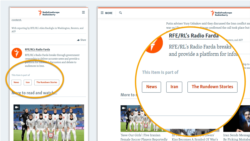
A link appears for every public category that is assigned to the page. Each link opens the relevant category page.
What you need to do
The default header text above category links is This item is part of.

After the 8.46 release, non-English sites must localize the header text on the Site localization page in Pangea CMS. Use the following key:
- Common.Title.CategoryListHeadline
To learn how to use site localization, see Using site localization.
Category visibility
The following categories do not appear under This item is part of, even if they are assigned to the article:
- Categories without a category page.
- Categories with the Visible in CMS only, Disabled, or Archive status.
TIP: Use the Visible in CMS only status for categories that should not appear publicly on article pages.
Number of categories
An article can have one or multiple categories. The number of categories affects where category links appear:
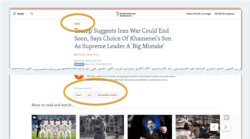
- One category: The category appears at the top of the article. It does not appear again at the bottom.
- Multiple categories: All categories appear at the bottom of the article. The primary category also appears at the top.
Order of elements
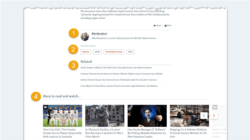
The elements at the bottom of articles now appear in the following order:
- Author highlights
- Category links (NEW)
- Related content
- You Might Also Like
Author highlight redesign
Author highlights on article pages have a streamlined new look, showing just the key data:
- (A): Image
- (B): Name
- (C): Short description
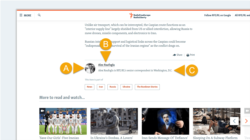
The new design occupies less space on the page, while still highlighting the experience and expertise of your authors.
If Highlight author is enabled in the settings for an individual author, the author highlight appears automatically on all articles where the author is assigned.
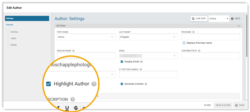
Short description: New guidelines
The highlight description is set via the Short description field in the author settings.
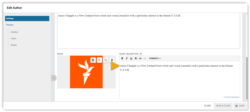
We recommend a maximum of 140 characters for the short description. Longer descriptions:
- Extend the length of the page, which can overwhelm readers (especially on mobile).
- Reduce engagement with links below the author highlight, such as related content.
For detailed information about author settings in Pangea CMS, see Creating an author.
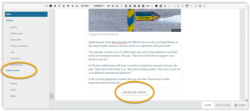
Editors can now add related content for feature stories in Pangea CMS.
On the website, related content appears below the main content. It helps readers explore more content without interrupting the reading experience.
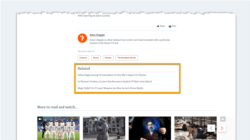
To add related content, use one of the following options on the edit page for your feature story:
- Select Related content in the left menu.
- On the Editor subpage, click Add related content below the main content.
More control over access to AI suggestions
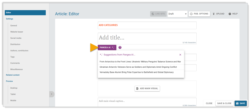
AI suggestions can now be enabled separately for each text type. For example, your service can have access to AI suggestions for headlines but not for other fields.
Request feature access
We can enable AI suggestions for individual services on request. To request feature access, contact Pangea Customer Care.
In your request, include the following details:
- Who should have access. We can enable the feature for your whole service or just for individual Pangea users.
- Which text types should have AI suggestions (see Supported text types for the full list).
NOTE: For RFE/RL services, we can enable AI suggestions only for titles (main, teaser, and social). This follows RFE/RL editorial policy.
To learn more about AI suggestions, see Generating AI suggestions.
Quality selector on the audio player
On sites where adaptive audio streaming is enabled, the audio player now includes a quality selector. This allows listeners to manually adjust the audio quality.
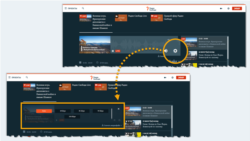
When adaptive audio streaming is enabled, the audio quality adjusts automatically based on the listener's internet connection speed. Listeners can also adjust the quality manually using the quality selector.
Request feature access
We can enable adaptive audio streaming for individual services on request. To request feature access, contact Pangea Customer Care.
Removal of regions from Pangea CMS
Regions were removed from websites in Pangea 8.45. In Pangea 8.46, regions will also be removed from Pangea CMS.
IMPORTANT: If your service still needs to review content previously promoted through regions, you must do this before the 8.46 release.
To learn more, see Region retirement.